PlayOnline Viewer Has Stopped Working.

|
PlayOnline viewer has stopped working.
Recently, my computer updated (OS=Windows Vista) an overnight update and it shut itself off accordingly. Now last night I had no problem with this, but now everytime I try to run FFXI be it, Windower or the PlayOnline client I always get the "Microsoft Windows" PlayOnline Viwer has stopped working etc etc. I was wondering if anyone out there would mind helping me to get FFXI to run again ._.;
could try downloading the Vista version, un-installing your version, and re-install it?
sounds like some pol files might have sopped working Did you already have the Vista/7 POL? Or the one that comes on the discs? If you don't have it, get it. If you already do have it, try setting it to run in different compatible modes and make sure you're running as administrator.
Bismarck.Misao said: could try downloading the Vista version, un-installing your version, and re-install it? I already use the Vista version, What would a re-install do? Valefor.Slipispsycho said: Did you already have the Vista/7 POL? Or the one that comes on the discs? If you don't have it, get it. If you already do have it, try setting it to run in different compatible modes and make sure you're running as administrator. UAC is disabled, Other compatibility modes do nothing different. Aside from the obvious get the vista POL from playonline
Do a POL file check yet. Disk check. etc. Also what kind of update you get. And upgrade to 7! This sounds strikingly familiar to:
http://www.ffxiah.com/forum/topic/21080/pol-and-windower-not-working-anymore/ That is 7 x64, not Vista... I wonder if this is a Windows issue now? Edit: Posting first thing after waking up = Bad idea. Leviathan.Remoraforever said: Bismarck.Misao said: could try downloading the Vista version, un-installing your version, and re-install it? Valefor.Slipispsycho said: Did you already have the Vista/7 POL? Or the one that comes on the discs? If you don't have it, get it. If you already do have it, try setting it to run in different compatible modes and make sure you're running as administrator. Leviathan.Remoraforever said: Bismarck.Misao said: could try downloading the Vista version, un-installing your version, and re-install it? I already use the Vista version, What would a re-install do? Valefor.Slipispsycho said: Did you already have the Vista/7 POL? Or the one that comes on the discs? If you don't have it, get it. If you already do have it, try setting it to run in different compatible modes and make sure you're running as administrator. UAC is disabled, Other compatibility modes do nothing different. Bahamut.Dasva said: Leviathan.Remoraforever said: Bismarck.Misao said: could try downloading the Vista version, un-installing your version, and re-install it? Valefor.Slipispsycho said: Did you already have the Vista/7 POL? Or the one that comes on the discs? If you don't have it, get it. If you already do have it, try setting it to run in different compatible modes and make sure you're running as administrator. With Vista UAC disabled = Everything in Admin mode. I'm going to check and re-download the Vista fix for FFXI from the playonline site, I hope it works if not I have to do a re-install X_X Valefor.Slipispsycho said: Are you running as Admin? Turning off UAC doesn't mean you can just stop running stuff as Admin, my UAC gets turned off the very first start-up on a new computer/reformatted one, and I still have to use run as Admin pretty frequently. Leviathan.Remoraforever said: Bahamut.Dasva said: Leviathan.Remoraforever said: Bismarck.Misao said: could try downloading the Vista version, un-installing your version, and re-install it? Valefor.Slipispsycho said: Did you already have the Vista/7 POL? Or the one that comes on the discs? If you don't have it, get it. If you already do have it, try setting it to run in different compatible modes and make sure you're running as administrator. With Vista UAC disabled = Everything in Admin mode if you have administrative rights. I'm going to check and re-download the Vista fix for FFXI from the playonline site, I hope it works if not I have to do a re-install X_X Thanks, Just tried running it in admin mode, still same problem does a double up of the crash window. And the update is the only thing that has changed right? You haven't changed any of the drivers for your hardware or changed any other system settings or anything, correct?
How far can you get into it? Hell why not just do a system restore
i have this same problem every time i zone.
Valefor.Slipispsycho said: And the update is the only thing that has changed right? You haven't changed any of the drivers for your hardware or changed any other system settings or anything, correct? Nada, everything is as what its been for weeks, and some stuff months. Bahamut.Dasva said: How far can you get into it? Hell why not just do a system restore After the FFXI splash screen and the client for logging in and starting FFXI closes and the FF window pops, screen for it goes white and I get the error message. I was thinking about doing so, just wasn't sure if I'd have to constantly block the Windows update as it auto does it after you don't respond for so long. When's the last time you tried updating your video drivers?
Valefor.Slipispsycho said: When's the last time you tried updating your video drivers? Mmm, maybe a month or two ago perhaps. Leviathan.Remoraforever said: Valefor.Slipispsycho said: When's the last time you tried updating your video drivers? Mmm, maybe a month or two ago perhaps. Here's someone who has your same problem, that had it happen very recently. Quite possible both of you got screwed over by the same update. My guess, like one of the posters on that thread is that the update *** with the registry somehow, since nothing has changed. It's not uncommon to happen, either. Valefor.Slipispsycho said: Leviathan.Remoraforever said: Valefor.Slipispsycho said: When's the last time you tried updating your video drivers? Mmm, maybe a month or two ago perhaps. Here's someone who has your same problem, that had it happen very recently. Quite possible both of you got screwed over by the same update. My guess, like one of the posters on that thread is that the update *** with the registry somehow, since nothing has changed. It's not uncommon to happen, either. Thank you slip, I'll try it and get back and let you know if it worked. Leviathan.Remoraforever said: Valefor.Slipispsycho said: Leviathan.Remoraforever said: Valefor.Slipispsycho said: When's the last time you tried updating your video drivers? Mmm, maybe a month or two ago perhaps. Here's someone who has your same problem, that had it happen very recently. Quite possible both of you got screwed over by the same update. My guess, like one of the posters on that thread is that the update *** with the registry somehow, since nothing has changed. It's not uncommon to happen, either. Thank you slip, I'll try it and get back and let you know if it worked. Okay, I've updated my Video drivers, I've re-installed PoL viewer and still nothing same message as before. Edit: I tried to startup System restore but no window will open and when I try to run it a second time it gives me "Window is already open this program will now close" I think you're just going to have to go ahead and reinstall.. =/
I'm tapped out of ideas. I have Vista x64 and just did a full windows update last night. Since I haven't logged into POL/FFXI in a week I don't know if I'll have the same issue. I can try when I get home in about 2 hours just for extra confirmation to if its Vista x64 specific or something else.
I have to run mine as administrator. If I just double click it to open it, I get the same message you're getting. I also have Win7
edit: nvm, just read the rest of the post... I see that didn't work >.< Did a system restore to the last point before last night's update. Now I get this when I just try to =run= either PlayOnline or Windower clients.
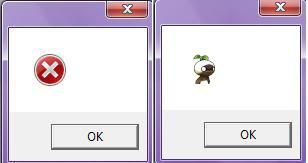 Well, I just grabbed 4 more updates that were published yesterday and didn't require a reboot. I am able to run and log into XI with no problems. I'd look into a virus scanner or possibly reinstallation of windows.
Lakshmi.Hypnotizd said: Well, I just grabbed 4 more updates that were published yesterday and didn't require a reboot. I am able to run and log into XI with no problems. I'd look into a virus scanner or possibly reinstallation of windows. My computer didn't come with an installation disc, and the problems have just gotten worse as today has passed I've already done 5 different virus scans from different anti-virus's and nada. I think my computer shut off prematurely during the update and borked some of the registry keys. Which when I did a system restore probably messed it up even worse. I'm sitting here with a broken computer at the end of my wits completely clueless at what to do ; ; Leviathan.Remoraforever said: Lakshmi.Hypnotizd said: Well, I just grabbed 4 more updates that were published yesterday and didn't require a reboot. I am able to run and log into XI with no problems. I'd look into a virus scanner or possibly reinstallation of windows. My computer didn't come with an installation disc, and the problems have just gotten worse as today has passed I've already done 5 different virus scans from different anti-virus's and nada. I think my computer shut off prematurely during the update and borked some of the registry keys. Which when I did a system restore probably messed it up even worse. I'm sitting here with a broken computer at the end of my wits completely clueless at what to do ; ; Did you try and uninstall the up date???
|



















All FFXIV and FFXI content and images © 2002-2025 SQUARE ENIX CO., LTD.
FINAL FANTASY is a registered trademark of Square Enix Co., Ltd.